
510 battery settings tell you how a compatible device delivers power, while preheat, charge indicators and warning lights describe separate functions that vary by model. To understand your battery, identify its exact model and read its instructions before interpreting a voltage number, button sequence or flashing light.
A light comes on, but what did it actually confirm? A battery might be showing its charge, a selected output mode, a preheat cycle or a fault. The meaning depends on what you were doing when it appeared, not the color alone.
At High Society, we prefer a model-matched explanation over a color chart that only applies to one battery. Here’s the fastest way to separate a setting from a warning.
Not sure what your battery is showing?
- Find the model. Check the device or packaging for the exact name.
- Identify the moment. Did the signal appear while charging, changing modes or connecting a cart?
- Read the units and pattern. Match volts, watts, lights and button presses with that model’s manual.
- Know when to stop. If the pattern is undocumented or the hardware looks damaged, contact the manufacturer.
What do 510 thread battery settings actually mean?
A 510-thread battery supplies power to a compatible threaded cartridge, but the thread describes the connector, not the controls, power range or activation system. Some batteries have a button with a few preset modes. Others have a display and adjustment buttons. Some activate when you inhale. A few combine more than one control method.
Most of the labels and lights fall into four groups: the current power setting, the battery’s charge status, an optional preheat mode, or a warning. That distinction helps you interpret a light without guessing what its color must mean.
Before changing a setting, check whether the device is showing volts (V), watts (W) or only a light pattern. Those are three different kinds of information. A blank or unmarked display does not justify guessing at the setting.
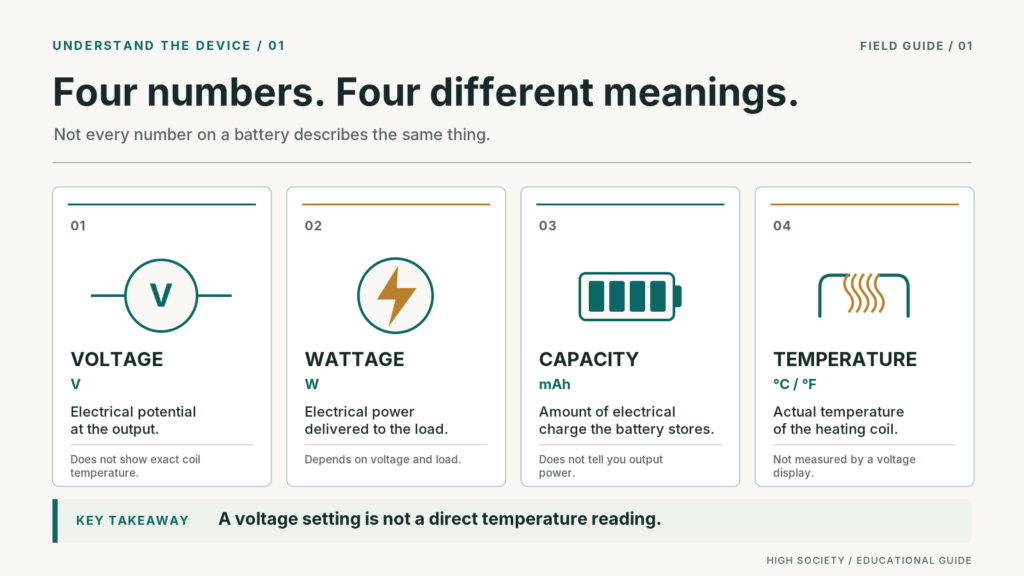
How are voltage, wattage, temperature and mAh different?
Voltage, measured in volts or V, is the electrical potential applied to the cartridge’s heating circuit. On an adjustable battery, changing voltage changes an electrical input. The effect depends on the coil, its resistance and how the device regulates its output. A voltage value isn’t a direct thermometer reading.
Wattage, measured in watts or W, describes electrical power. A battery can offer selectable watt-based modes rather than voltage steps. Watts and volts are not interchangeable: power also depends on the electrical load. For an ideal resistive load, P = V²/R. In everyday terms, two cartridges at the same displayed voltage can draw different amounts of power if their resistance differs. Real devices may regulate output and behave differently under load, so this is an explanation, not a setting recommendation.
Temperature is the heat reached by the coil, not the voltage displayed on a battery. A 2022 PLOS ONE thermography study compared one temperature-controlled system with two voltage-controlled systems during simulated draws. Voltage alone was a poor predictor of coil temperature in those experiments. The researchers modified the devices to measure the coils directly, and the authors were PAX Labs employees whose employer funded the work. Those limited laboratory results do not establish a temperature for an untested cartridge or a universal voltage recommendation.
mAh, or milliamp-hours, measures battery charge capacity, not the output mode or the coil’s temperature. Two batteries with the same capacity may have different controls and outputs. If a display labels its adjustment a “temperature level” but shows volts, it is not directly measuring degrees. Read the displayed unit, not just the menu label.
| Setting or feature | What it tells you | What it does not prove |
|---|---|---|
| Voltage (V) | Selected electrical potential at the output | The coil’s exact temperature or universal cartridge suitability |
| Power (W) | Electrical power or a watt-based output mode | An equivalent voltage across every cartridge |
| Capacity (mAh) | Amount of electrical charge the battery can hold | The cartridge’s heating power |
| Preheat | A temporary operating function, if the model provides it | That a clog or electrical fault has been repaired |
| LED or screen | Model-specific charge, mode or warning information | A meaning shared by every battery with the same color |
On a narrow screen, swipe the table sideways to read every column.
Each unit answers a different question. A display reading 3.2V on a voltage-adjustable model identifies an electrical setting. It does not mean the coil is 320 degrees, the battery is 32% charged or the cartridge is compatible.
Where can you find the correct instructions for your battery?
Check the exact model printed on the device, its original packaging or the supplied booklet. Then find the matching manufacturer manual, not simply the first video showing a similar-looking battery. If the maker has released multiple versions, compare the model name and control layout before following a button sequence.
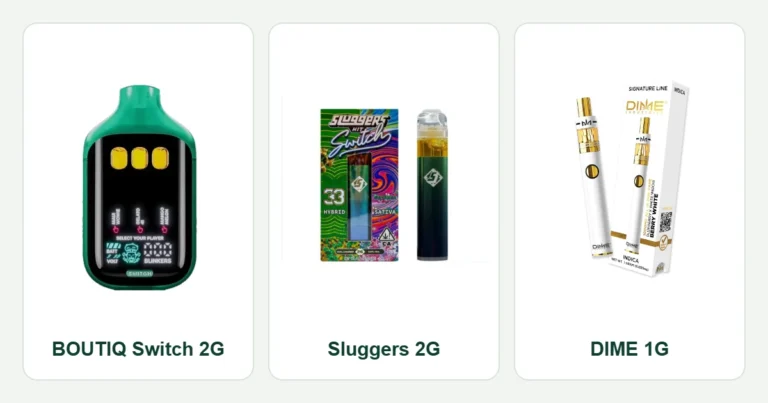
The control label matters because real batteries use different units and different commands. These three documented examples show how to read a specification without copying its setting to another device.
Can’t identify the model? Look at the underside, original box, supplied instructions or the seller’s product description. Match the physical buttons and screen layout as well as the name. If the model still isn’t clear, ask the manufacturer or seller before using an unfamiliar click sequence. Never assume a video showing a lookalike battery applies to yours.
What does preheat do on a 510 battery?
Preheat is an optional temporary heating function built into certain batteries. Its duration, electrical output, activation method and indicator behavior are determined by the manufacturer. Not every 510 battery has preheat, and the presence of a button doesn’t mean the feature is available.
On the CCELL Palm Pro, two short presses start its ten-second preheat. Two power-button presses on the Yocan UNI Pro 2.0 also activate preheat. But on the PCKT VRTCL, two presses enter watt-based power-mode selection instead. These functions come from each model’s published instructions; they do not establish a universal two-click command.
Preheat should not be treated as a universal solution when a cart stops working. A restricted mouthpiece, an unsuitable connector and a discharged battery are different problems. Avoid repeating heating cycles to force a result, and never use external flames, improvised wiring or direct heat as substitutes for proper device instructions.
Why do button clicks and battery-light colors mean different things?
A battery can use one indicator for several functions. A quick press may display its charge level when idle, while a different sequence switches modes. The same light may flash during startup, charging or an error. A red, blue or green light cannot be decoded reliably unless you know the model and what happened immediately before the light appeared.
Ask two questions together: What action preceded the light? and How did the complete pattern look? A flash count without its charging, output or connection context is an incomplete description.
For example, imagine a battery that displays a light immediately after connecting a charger. That is a different context from an indicator that appears immediately after selecting a power mode. Neither situation proves a particular meaning without the manual. The useful question is: “On this exact model, after this action, what does that pattern signify?”
How can you decode a battery indicator without guessing?
Use the decoder below before interpreting a color or blink count. Start with the exact model, identify whether the indicator appears during charging, mode selection, preheat or a possible fault, and only then compare it with the manual. One light can serve several purposes on the same battery.
Start with the exact battery model and manual
Match the exact light and button action to the manual. No universal colors or clicks.
Note: when it appeared, the preceding action, the full light pattern and whether the cartridge was attached.
Write down the context before contacting support. For example, “three flashes immediately after connecting the cartridge” gives the manufacturer more to work with than “the light is blue.” The exact model and full indicator pattern are still needed before anyone can identify the cause.
What does a light mean during charging, mode selection or cartridge connection?
During charging: first check whether the manual calls the light a charge-status indicator. A glowing light during charging alone cannot tell you which voltage or wattage setting is selected.
After a settings command: check whether the manual describes the displayed number, color or pulse as confirmation of an output mode. For example, 3.2V on a voltage-setting display names an electrical setting, not 32% battery charge. The unit and the action together resolve that confusion.
After attaching a cartridge: a new pattern might indicate a connection issue or a normal status response, depending on the model. Check whether the cartridge is attached as the manual specifies, then compare the full pattern with the documented connection messages. If it is undocumented, stop rather than trying random button combinations.
How can you check cartridge compatibility before adjusting settings?
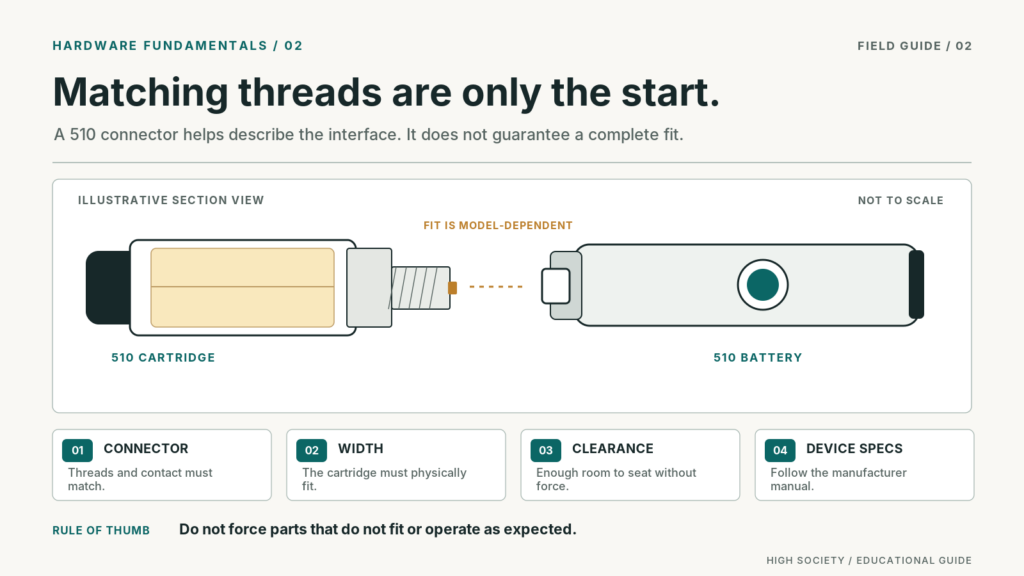
Threads are only one part of fit. A cartridge may have a 510-style connector and still be too wide for a recessed battery housing, require a magnetic adapter or fall outside a maker’s recommended electrical specifications. Some devices use proprietary pods instead of threaded cartridges at all. A matching thread shape also does not establish that every voltage or wattage mode is appropriate for a particular cartridge.
Read the cartridge and battery information together. Check the connector type, physical clearance and any manufacturer limits before attaching anything. Join the pieces gently as described in the manual; forcing a cartridge into a tight chamber or overtightening the connection can create a separate hardware problem.
If you’re still comparing formats, our guide to cartridges, disposables and pods explains the hardware differences without mixing them up with the settings on a particular battery. The right format comes before the right setting.
When should you stop changing settings and look for another problem?
Stop treating the issue as a settings question when the manual points to a connection or error state, when the cartridge doesn’t fit properly, or when the device behaves differently from its documented controls. Repeatedly switching modes cannot repair damaged threading or a failed electrical contact.
If the hardware is cracked, leaking, unusually hot, visibly damaged or behaving unpredictably, discontinue use and contact the seller or manufacturer for support. Keep the original packaging if available. Don’t pry up internal contacts, open a sealed battery or charge equipment that shows obvious damage.
When the draw itself feels blocked, that’s a different question from voltage and preheat. Identify the symptom first, then follow the device maker’s cleaning or support instructions rather than applying extra power in the hope of clearing it.
One useful rule: If an instruction depends on an LED color, a voltage number or a count of button presses, it must name the exact model that instruction belongs to. Otherwise, treat it as incomplete.
Where can you compare vape hardware and battery formats?
At High Society, we group compatible-device questions with our Vapes, Disposables & Batteries menu. It’s a starting point for understanding the hardware formats available on our menu, not a substitute for reading the exact battery and cartridge specifications.
Look for the model name, connector and supported operating instructions before assuming two products will work together. You can also learn more about High Society. We would rather have you understand the hardware than choose a setting by trial and error.
What are the most common questions about 510 battery settings?
What if my 510 battery has no visible model number?
Check the box, receipt or product description and compare the controls with the manufacturer’s documentation. If you still cannot identify it, ask the seller or maker instead of trying a button sequence from a different model.
Do two clicks always activate preheat?
No. Some batteries use two clicks for preheat, while others use the same action to select output modes. Button sequences are model-specific.
How do I tell a charge light from a voltage-setting light?
First note whether the light appeared after connecting a charger or changing the output mode. Then match the exact sequence and model to the manual; color alone cannot tell you which one it is.
Does a higher mAh battery deliver more power?
Not necessarily. mAh measures charge capacity, not the voltage or wattage delivered to a cartridge. Output depends on the battery design and controls.
Is a voltage setting the same thing as coil temperature?
No. Voltage is an electrical input, not a temperature reading. Actual heating also depends on the cartridge’s construction, resistance and operating conditions; consult the exact device instructions rather than converting volts into degrees.
What’s the simplest way to understand your 510 battery?
Read the model first, the setting second and the light pattern in context. Voltage, wattage, charge capacity and preheat describe different things, and a button sequence that works on one battery may do something entirely different on another. Keep the exact device instructions close, check cartridge compatibility and stop when the hardware appears faulty.
At High Society, we want the controls to make sense before you change them. A model-matched manual and the context of each indicator are more useful than a universal light-color chart.